A linear luminaire photometric curve is a map of luminous intensity by direction. Before comparing the shape of two curves, check their units, the orientation of the luminaire and the configuration named in the report. A larger-looking lobe does not, by itself, mean more lumens, a wider useful lighting area or a better result in your room.
Those three checks turn a catalogue graphic into something useful for selection. They also help you identify when the next step should be a request for the original photometric file rather than another comparison of screenshots.
Read the unit before comparing the curve
A polar light distribution curve describes how strongly a source emits light in particular directions. Its radial scale represents luminous intensity. The SI unit of luminous intensity is the candela, abbreviated cd.
Keep that quantity separate from lumens, which describe luminous flux, and lux, which describe illuminance at a surface. A value read from an intensity curve is not the illuminance on a desk. It also does not tell you the electrical power or efficacy of the luminaire.
Look closely at the scale label. cd gives an intensity value directly. cd/klm, sometimes written cd/1000 lm, gives intensity normalised to a reference flux of one kilolumen. This allows distributions with different outputs to be shown on a common basis.
Normalisation is useful when comparing distribution shape. It becomes a trap when the reference flux is missing, or when a normalised plot is compared with an absolute-candela plot as though their radial values mean the same thing. Record the unit before drawing a conclusion from the outline of the lobe.
Match the planes to the luminaire orientation
A linear fitting has a long axis, so the distribution along the run can differ from the distribution across it. The plotted lines usually show selected vertical cuts through a three-dimensional distribution.
The C0–C180 and C90–C270 labels identify different photometric planes. Match those labels to the orientation drawing in the supplied report. Do not carry a colour or dashed-line convention from one manufacturer’s graphic into another.
Then read the angular scale. In the example report excerpt below, gamma 0° points vertically down and 90° points horizontally. The radial scale is labelled cd, so it gives luminous intensity in candela directly. The red curve is labelled C0/180 and the green curve C90/270. Match those plane labels to the luminaire orientation in the supplier’s documentation before relating a lobe to a direction in the room.
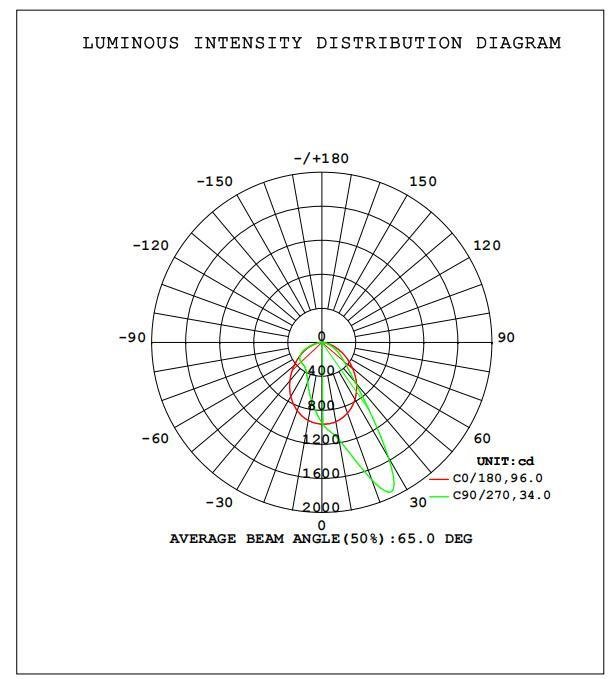
The two C-plane curves describe different directional cuts through the reported distribution. In this example, the green curve has a stronger off-axis lobe. That shape is useful evidence about directionality, but the image alone does not identify which side of the installed fitting faces a target. Ask for the orientation record and the complete photometric file when that distinction matters. A pair of principal-plane curves may omit features visible in other planes.
Convert normalised intensity with the right reference flux
To recover candela from a normalised value, multiply the reading in cd/klm by the declared reference flux in kilolumens. Do not substitute watts, an LED-chip lumen figure or the output of another configuration.
A worked example with hypothetical data
For a separate, hypothetical normalised report, suppose the reading is 300 cd/klm at gamma 0° and the declared reference flux is 4,000 lm. That is 4 klm, so the intensity in that direction is 300 × 4 = 1,200 cd. These invented values are not readings from the example chart above, which is already expressed in candela.
If a second configuration genuinely has the same normalised distribution and a declared reference flux of 6,000 lm, the corresponding value is 300 × 6 = 1,800 cd. The shared curve is an explicit assumption in this example. A changed optic, assembly or operating condition must not be assumed to preserve it.
| Report case | Reading and reference | Intensity at that direction |
|---|---|---|
| Normalised example A | 300 cd/klm; 4,000 lm reference | 1,200 cd |
| Same normalised distribution, example B | 300 cd/klm; 6,000 lm reference | 1,800 cd |
| Already expressed in candela | 1,200 cd | 1,200 cd; do not scale again |
These are invented teaching values, not Felix test results. Their purpose is to show why both the scale and its reference basis must accompany a curve.
Why absolute photometry can still appear as cd/klm
The measurement method and the units used to display or store a distribution are separate questions. A normalised table does not automatically mean that only a replaceable lamp, rather than a complete luminaire, was measured.
In an EULUMDAT file, the lamp-count field identifies absolute photometry while the intensity table is specified in cd/1000 lm. The flux field refers to lamp flux for relative photometry and luminaire flux for absolute photometry. Read these fields together when interpreting the supplied data.
For selection, ask what the report uses as its reference flux and whether the displayed curve has been normalised. This is not an instruction to multiply the raw values in every IES file. Read the original file through a suitable photometric viewer and reconcile its displayed units with the report.
Separate the curve from room performance
A polar curve helps you discuss directionality. It does not show the illuminance across a real work surface. An isolux diagram represents illuminance over a defined area and serves a different purpose.
Room dimensions, luminaire positions, orientation, surface properties and the calculation plane belong in the project model. A curve that appears broad on the page cannot establish uniformity across a desk layout. Similarly, a narrow-looking lobe is not sufficient evidence for a glare claim. The CIE description of its interior discomfort-glare method includes observer position and viewing direction; those conditions are absent from a stand-alone polar graphic.
Use the existing UGR and diffuser guide when the decision concerns glare evidence. Keep this first reading focused on what the graph actually supplies.
An upper lobe can show intensity in upward directions, but do not estimate a total upward-light percentage from its drawn area. Two plotted cuts are only slices of the distribution. Request the reported flux split or complete directional data when that ratio matters to the design.
Ask for the file that matches the proposed configuration
A useful handoff is specific: “Please confirm the model, optic and operating configuration represented by this curve, the report revision, the luminaire orientation and the flux used for normalisation. Please provide the matching original IES or LDT file.”
Use a photometric viewer that supports the supplied IES or LDT file. Retain the original supplied file and its report together. Successfully opening a file does not establish that it belongs to the quoted fitting, and an edited export should not replace the supplier’s original evidence in your records.
For the wider selection package, use the linear luminaire cutsheet checklist. It covers the supporting information around the photometry without making the polar graph carry the whole specification.
Felix’s product range provides a starting point for discussing linear profiles and related configurations. The example report excerpt illustrates how to read a supplied chart; the separate numerical examples use hypothetical data. Neither identifies a released Felix model or measured Felix performance. If you are evaluating a proposed configuration, send Felix the model details and an annotated copy of the report so the matching photometric evidence available for that configuration can be confirmed.